Music Fridays Presents : Ode to DJs
Before we can even get to the interesting stuff, we all have to be speaking the same language. Here are a few terms you should know to communicate with other DJs effectively... Pitch control - Pitch lock - Pitch bend - Tempo - Mixers - Turntables (alias: TT's) - Beats Per Minute (BPM) - Cueing - Throwing - Cross fader (alias: x-fader, fader) - Beatmixing (alias: beat matching, beat synching, hot mixing, mixing) Decks - The single greatest piece of advice that can be given to someone starting out is -- PRACTICE! Many aspects of DJing are reasonably intuitive and will present themselves the more you practice. The core of being this sort of entertainer is being able to work your music. Learn your songs well, and get your beatmixing down solid. A natural progression will start from there. The hardest part about writing this document is covering all the different choices available. From my experience and listening to professional DJs, I've learned that most decisions are personal choices which only you can make. If you find yourself unsure about what direction you want to take, examine both for yourself. Its not nearly as easy as someone telling you "decision X is the best way to go," but you will be much more confident in your choice and will have much less room for bad decisions. The first few questions you have to ask yourself are common amongst beginners, and they are: Do I really want to do this? This may seem like a terribly odd question to be asking, but it is something that you need to evaluate carefully. DJing requires a lot of time, energy, money, and patience. If you aren't sure you have these sort of facilities, avoid making any commitments until you are sure. What sort of equipment do I need to start with? If you aren't sure about whether this is something you want to seriously pursue -- don't buy anything. Find a friend who'll let you use their equipment and practice on it a bit. (Don't forget to take them out to dinner in exchange! =) Once you're sure you want to get into this some more, be ready to drop serious money on gear. Professional level gear should run you about $1000 to get started. This will include either a pair of turntables or a pair of CD players, and a mixer. You can use a home stereo as your amps and speakers while you get started. If you aren't sure that you're going to be doing this for the long haul and can't drop $1000 for equipment, then skimp as much as you can and save for the real stuff once you're sure. This means getting turntables with minimum features (ie: Gemini XL-BD10's) and a simple mixer. If you're going to spin CDs, this becomes tough real quick... the minimum priced pitch control CD decks are from Gemini and cost about $250 a piece. They are good starter decks, but moving up to better CD players in the future is something to seriously consider. Bottom line: Spend the least you can if you aren't sure. Buy the real stuff as soon as you can afford it and are sure thats the direction you want to take. And don't forget to buy a pair of good headphones! 
Hi Guys! Lady Wiz here Welcome to my first Music Fridays Post. I pick DJing to start off with because well thats what I had on My mind when I came up with the idea ^_^
Djs are pretty cool. I know quite a few and they all love what they do.
So, What is a DJ? Tough question. A DJ (disc jockey) takes many forms. The three most common forms is: Radio DJs, Mobile DJs, and Club DJs. All three share the common goal of providing an entertainment for a wide variety of people through various means, mostly however, through music.
A DJ's job is to combine all the elements necessary for their performance into one fluid package which can be easily swallowed by all of his or her's listeners. For some DJs this includes talk and games, while for others it means spinning the latest and greatest to the hippest people in town.
All DJs, however, deserve respect for the job they do. It gets really tough among DJs themselves simply because you can't fit too many ego-inflated heads into one room without some of them bumping into each other (and believe me, the average DJ has an ego-inflated head... ^_^. But in the end, we're all trying to accomplish the same thing -- providing entertainment. Got to Respect that.
Below Is just a small peek into the DJ world. What they do, What they use a few tips and tricks, and of course a program list bonus for my computer music art friends. You guys know me ;-)
Enjoy!
________________________________________________________________________________________________________
DJs
The Defination:
A disc jockey or DJ is a person who selects and plays prerecorded music for an audience.
There are several types of disk jockeys. Radio DJs introduce and play music that is broadcast on AM, FM, shortwave or digital radio stations. Club DJs select and play music in a bar, club, disco, a rave, or even a stadium. Hip hop disc jockeys select, play and create music with multiple turntables to back up one or more MCs. In reggae, the disc jockey (deejay) is a vocalist who raps, toasts, beatboxes or chats over pre-recorded rhythm tracks while the individual choosing and playing them is referred to as a selector. [1] Mobile disc jockeys travel with portable sound systems and play from an extensive music collection at a variety of events.
________________________________________________________________________________________________________
The Equipment:
DJ equipment consists of:
* Sound recordings in a DJs preferred medium (eg. vinyl records, compact discs, computer media files)
* A minimum of two devices to play sound recordings, for alternating back and forth to create a continuous playback of music (e.g. record players, compact disc players, computer media players such as an MP3 player)
* A sound system for amplification or broadcasting of the recordings (e.g. portable audio system, PA system) or a radio broadcasting system.
* A DJ mixer, an electronic two-channel mixer with a crossfader used to smoothly go from one song to another (using two or more playback devices)
* Headphones, used to listen to one recording while the other recording is playing to the audience, and
* Optionally, a microphone, so that the DJ can introduce songs and speak to the audience.
Other equipment can be added to the basic DJ set-up (above) providing unique sound manipulations. Such devices include but are not limited to:
* Electronic effects units (delay, reverb, octave, equalizer, chorus, etc). Some club DJs use a suboctave effect which creates a very low bass sound and adds it to the mix.
* A computerised performance system, which can be used with timecode encoded vinyl/CD content to manipulate digital files on the computer in real time.
* Multi-stylus headshells, which allow a DJ to play different grooves of the same record at the same time.
* Special DJ digital controller hardware can manipulate digital files on a PC or laptop, by using midi signals
* Samplers, sequencers, electronic musical keyboards (synthesizers), or drum machines.
Several techniques are used by DJs as a means to better mix and blend prerecorded music. These techniques primarily include the cueing, equalization and audio mixing of two or more sound sources. The number, complexity, and frequency of special techniques depends largely on the setting in which a DJ is working. Radio DJs are less likely to focus on music-mixing technique than club DJs, who rely on a smooth transition between songs using a range of techniques.
Club DJ turntable techniques include beatmatching, phrasing, and slip-cueing) to preserve energy on a dancefloor. Turntablism introduces the use of cutting, beat juggling, scratching, needle drops, phase shifting, back spinning, and more to perform the transitions and overdubs of samples in a more creative manner (though turntablism is often considered a use of the turntable as a musical instrument, rather than a tool for blending prerecorded music). Professional DJs may use harmonic mixing to choose songs that are in compatible musical keys.
________________________________________________________________________________________________________
The Types:
The role of selecting and playing prerecorded music for an intended audience is the same for every disc jockey. The selected music, the audience, the setting, the preferred medium, and the level of sophistication of sound manipulation are factors that diffentiate different DJ types.
Radio disc jockeys
A radio disc jockey plays music that is broadcast across radio waves, AM and FM bands or worldwide on shortwave radio stations. Radio DJs are notable for their personalities. Often due to terrestrial radio using program directors/music directors to generate the playlist, present-day radio DJs do not typically pick the music to play at stations. Emceeing is their primary duty. For more information see Notable Radio DJs.
Club disc jockeys
A club disc jockey is one that selects and plays music in a club setting. The setting can range anywhere from a neighborhood party or a small club to a disco, a rave, or even a stadium. The main focus of club DJs is on the music they play. They build their sets by choosing tracks to control the energy level of the crowd and use beatmixing (or "beatmatching") technique for seamless transition between tracks.
Hip hop disc jockeys (Turntablism)
A hip-hop disc jockey is a DJ that selects, plays and creates music as a hip-hop artist and/or performer, often backing up one or more MCs. Hip-hop DJs do turntablism, the art of manipulating sounds and creating music using phonograph turntables and an audio mixer. DJ Babu has defined a turntablist as "One who has the ability to improvise on a phonograph turntable. One who uses the turntable in the spirit of a musical instrument;" while the Battlesounds documentary film suggests a definition of :"A musician, a hip-hop disc jockey who in a live/spontaneous situation can manipulate or restructure an existing phonograph recording (in combination with an audio mixer) to produce or express a new composition that is unrecognisable from its original ingredients."
Hip-hop turntablist DJs use turntable techniques like beat mixing/matching, scratching, and beat juggling. Turntablism is generally focused more on turntable technique and less on mixing. Some turntablists seek to have themselves recognized as musicians capable of interacting and improvising with other performers.
Notable hip hop disc jockeys
Jamaican-born DJ Kool Herc (born 1955) was the inventor of breakbeat technique; he is considered to be "the father of hip hop culture". Grandmaster Flash (born 1958), one of the early pioneers of hip-hop DJing, cutting, and scratching. Created the Quick Mix Technique, which allowed a DJ to extend a break using two copies of the same record; essentially invented modern turntablism. Afrika Bambaataa (born 1957 or 1960), instrumental in the development of hip-hop from its birth in the South Bronx to its international success. He also created the first hip-hop track to feature synthesizers; "The godfather of hip-hop"
Jazzy Jay (born c. 1962), pioneering DJ and co-founder, with Rick Rubin, of Def Jam Records. DJ Jazzy Jeff (born 1965), of DJ Jazzy Jeff and the Fresh Prince (also backed Will Smith on his solo efforts). Jam Master Jay (1965-2002), founder and DJ of Run-DMC, one of the most innovative hip-hop groups of all time. DJ Clue (born Ernesto Shaw on January 8, 1975 in Queens, New York City) is a mix DJ known for his involvement in the mix tape circuit. He signed as an artist on Roc-A-Fella Records. Eric B. (born 1965), one half of duo Eric B. & Rakim, popularized the James Brown-sampled funky hip-hop of the late 1980s. Terminator X (born 1966), DJ of the highly influential hip-hop group Public Enemy. Before rapper, Redman put out albums as an MC, he DJed for several New York City groups and solo artists and even was the official DJ for a New York night club under the name DJ Red Dott.
DJ Lethal, the DJ for Irish hip-hop group House of Pain who subsequently became the DJ for Limp Bizkit. DJ Qbert (born 1969), founding member of the turntablism group the Invisibl Skratch Piklz and three-time winner of the International DMC Award.Mix Master Mike (born 1970), skilled DJ of hip-hop group Beastie Boys, three-time winner of the International DMC Turntablism Award. The X-Ecutioners, a turntablist band with several collaborations with groups and artists, including Linkin Park and Xzibit. DJ Premier (born 1966), one of the duo Gang Starr. He also featured with many famous Hip-Hop artists like Nas, LL Cool J, Rakim and many others.
Reggae disc jockeys
In reggae terms, the deejay is traditionally a vocalist who would rap, toast, or chat to a "riddim". The term "selector" is reserved for the person who performs the traditional function of a DJ, though he does not always play the music. He often just selects the record and passes it to the mixer who plays it over the sound system.
Mobile disc jockeys
Mobile Disc Jockeys are an extension of the original Radio disc jockeys.They travel with or go on tour with mobile sound systems and play from an extensive collection of pre-recorded content for a specific audience. In the 2000s, mobile DJs need a large selection of music, professional-grade equipment, good organizational skills, vocal talent as an MC, mixing skills, quality lighting, insurance for liability, and on-site back-up equipment.[2] In the 2000s, the role of the Mobile DJ has expanded. Many Mobile DJs have assumed additional responsibilities to ensure an event's success. These responsibilities include the roles of MC, event organizer and coordinator, lighting director, and/or sound engineer.
In the past, Mobile DJs utilized vinyl records or cassettes. During the Disco era of the 1970s, demand for Mobile DJs (called Mobile Discos in the UK) soared, and top Disc Jockeys travelled with hundreds of vinyl records and cassette tapes.[2] In the 1990s, Compact Disc became the standard. Mobile Disc Jockey trade publications such as DJ Times magazine and Mobile Beat magazine were founded in this era.[3]Mobile DJs have formed professional associations such as the Canadian Disc Jockey Association (CDJA), the Canadian Online Disc Jockey Association (CODJA), the American Disc Jockey Association (ADJA), and the National Association of Mobile Entertainers[3] In the UK, associations include the National Association of Disc Jockeys (NADJ), and the South Eastern Discotheque Association (SEDA).
________________________________________________________________________________________________________
Terminology
The ability of a device to change the tempo of a song. This is very important if you are beatmixing.
The ability of a device to change the tempo of a song, without changing the pitch. This lets you drastically speed up songs with vocals without a "chipmunk" effect.
The temporary changing of pitch to get beats in phase. Vinyl DJs typically use their fingers to speed up or slow down the record by pushing/pulling the record by the label. Some twist the spindle in the center to change the pitch momentarily. CD players offer this as buttons. Once the DJ stops bending the pitch, the decks will automatically snap back to the current pitch control settings. This is necessary since its possible for two songs to be playing at the exact same tempo yet have their beats out of phase. By bending the pitch momentarily, the beats come into phase and the DJ doesn't have to worry about readjusting the pitch control.
The speed of a song. Usually measured in Beats Per Minute (BPM).
The essence of a mixer is that it can combine two or more audio signals into one output signal. It should be noted though that most mixers can do much more than just combine signals.
The proper term for a "record player." Now -- if you ever hear anyone say the "rec.. player" term again, you must take the time to either severely hurt them or educate them. Whichever you deem appropriate.
The number of beats during one minute of a song. An identifier of a song's tempo.
Using your headphones to find the spot you want to start the next song.
Giving a record a little push when it starts up so you don't have any lag time while it gets up to speed. CD players do this by featuring instant start. (normal CD players may take a few tenths of a second before a song starts) Throwing a record nulls the lag time while it accelerates from zero to 33ish RPM. It sounds silly at first but it is actually very critical for beatmixing. (see below)
A slider control which moves from one input channel to another in a very smooth fashion. The volume on each channel is inversely proportional to each other, so if the x-fader is completely on the left side, you will only hear the input for that channel. Once you start moving it to the right, you will gradually hear the right channel becoming louder. When the x-fader is in the middle, each channel will be of equal volume. As the x-fader continues to the right, the right channel will approach full volume, and the left channel will diminish.
The art of bringing the beats of two different songs into phase with one another and fading across. For example, if the song the crowd is hearing is 130 BPM, and the next song you want to play is 132 -- you slow the second song down to 130 bpm using pitch control, and cue it up to the beat. When you are ready to bring the second song into play, throw the record so the beats stay aligned and listen to it on your headphones. MAKE SURE THEY ARE IN SYNC!!! Once you are sure things are in order, use your cross fader to let the new song blend into the old one, and eventually go completely across so only the new song is playing. This will give the illusion that the song never ended.
Once you get the hang of getting beats into sync, you will quickly find many more interesting ways to fade in and out of songs.
A very generalized description of gear used by a DJ to play music. Most often referred to turntables and CD players.
- If you aren't clear on what a record is, don't worry a lot of us are too young to remember thought I'm quite impress you made it this far in the article without knowing :-O.
_________________________________________________________________________________________________________ "I want to learn how to DJ? What should I do?"
Tips and Tricks:
coming soon later today....technical difficulties ^_^
________________________________________________________________________________________________________
The Computer Tools:
T-RackS® 24
Quote:
Description
If you record music with digital gear, you already know how challenging it can be to get that warm, broad, analog sound. Yet, up until now, there's never been a way to achieve this leaving the digital domain and piping your music through expensive analog gear.
T-RackS® 24 has everything you need to create superb, tube-toned masters on your desktop.
Its rich, warm sound starts with algorithms based on true analog circuitry. Its familiar interface makes it easy to control five powerful processors: EQ, compressor, limiter, soft-clipping output stage, and a complete mastering suite. Enhances mix frequencies, stereo images, dynamic range and gives your audio a seamless, top notch sound.
T-RackS® 24 includes:
• State-of-the-art 6 band Mastering EQ
• Tube modeled stereo Compressor
• Multi-band Master Limiter
• Soft clipping output stage
• Studio mastering presets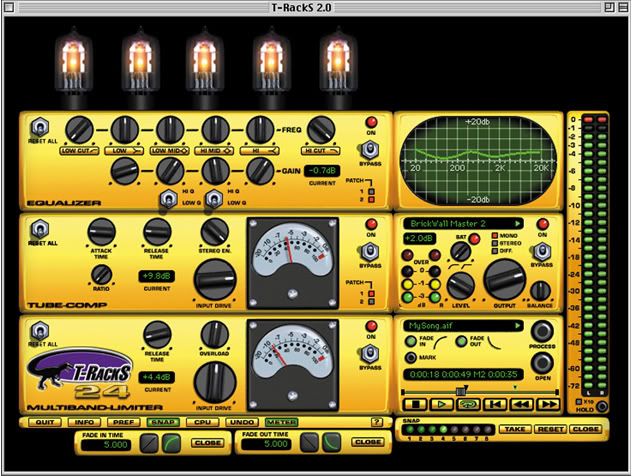
Code:
http://rapidshare.com/files/52604899/IK_Multimedia_T-Racks_24_v.2.04_by_best_up.rar
------------------------------------------------------------------------------------
Ableton Live 6.0.3
Quote:
Changes from Live 6.0.1 to Live 6.0.3
Improvements
Context menu in zone editor has two new entries:
- Select all parts with same range
- Reload loops from file
Easier macro-mapping by adding the "Map to Macro .." menu
to each context menu of a device parameter within a group.
Deferred opening of sample files when loading all kind
of documents (Live sets, presets, live clips, ...) which are
saved with Live version 6.0.3 or later.
Prohibit render/freeze/consolidate as long as there are samples decoding
or deferred loading
Several multi-sample import improvements
Several improvements related to scene selection:
- select scene on remote launch
- synchronizing the highlight and selection in more cases
- setting track highlight to return when clicking o a return Slot
- setting track highlight to Master when navigating from slot to scene by arrow
Performance improvement for documents with very large numbers
of midi clips in the arranger
Performance improvement for the loading of Live clips
Crop samples via context menu for for selections in session and arranger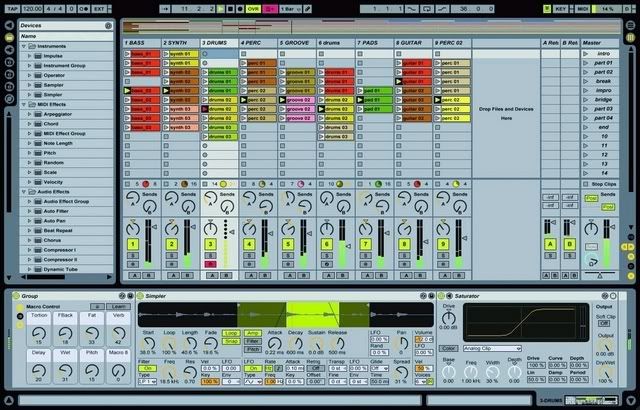
Code:
http://rapidshare.com/files/52601366/Ableton.Live.v6.0.3._by_best_up.rar
--------------------------------------------------------------------------
Numark Cue
Quote:
FLEXIBILE AUDIO I/O
Whether you use just your computer and headphones, a multi-channel ASIO sound card, an external DJ mixer, a Numark USB mixer, or a combination of hardware, Cue has multiple configuration options ready and waiting for you to plug into. As simple or as detailed as you want it to be, Cue’s flexible audio configuration is ready to fit in with your setup.
RHYTHM WINDOW
See your music: with a visual waveform overlay of beats, you can have 100% mixing accuracy. Multiple zoom levels for beat matching precision and complete control.
BROWSE, SEARCH, SORT
Navigate your music collection quickly and intuitively. Remember the title but not the artist? Search! Type in a keyword and you’re taken immediately to your results. Sort by title, artist, BPM, and more. Add songs to the Playlist for quick access and Automix capabilities.
HARDWARE COMPATIBILITY
Introduce your computer to the Numark iCDX™ for ultimate hands-on control with 2 way display and extended control. Use your MIDI controller; assign any and all of Cue’s controls like crossfader, gain, pitch adjust, samples, hot cues, and more to any standard MIDI controller.
SKINS
Choose the interface look you want based on your style of mixing.
BASIC
Just want 2 decks? Use this skin for powerful simplicity.
POWER AUDIO
Ready for effects and more? Power audio takes you to the next level.
INTERNAL MIXER
Need to travel light? For more on-screen EQ and Fader control, use the Internal Mixer interface.
SPICE IT UP
Choose from a variety of built-in effects or create your own plug-in. Activate as many effects at once as you like. With fully adjustable effect parameters, you have the power to add just a hint of Flanger or a blast of Backspin.
SCRATCH IT
Scratch and Pitch Bend directly with your mouse. Just click and drag the Control Dome to take charge of the decks. Choose between BPM or pitch % views by clicking on the dome.
SAMPLE AND LOOP IT
Create beat-matched samples and loops on the fly. Choose from preset samples or load your own. Beatlock your samples so they trigger and play on beat every time. Loop quickly and easily from 1/8th note to 16 bars, and with SmartLoop, you’re automatically on beat.
RECORD AND BROADCAST
Record your mix, burn it to a CD, and give it to your friends. Or go global with a click of the mouse – Broadcast! Invite a worldwide audience to your performance by using Cue’s built-in broadcast functionality.
KARAOKE
With CDG support, you can easily have the crowd singing along.
VIDEO
Mix and scratch your favorite video and audio files interchangeably with video transitions and effects. With Cue, every DJ is also a VJ. Project it on a wall, show it on your TV, or view it on a monitor. Make your set come alive with video!
BPM Detection Engine works with any style of music from House, Hip Hop, and R&B to Rock, Salsa, and Techno
Sync automatically so that your tracks stay on beat and in time
Search your personal music library quickly and easily
Save an infinite number of cue points per song
Multiple skins. Choose your look to match your style of mixing
Headphone preview and adjustable cue/mix volume
Choose from a variety of video effects and transitions
Code:
http://rapidshare.com/files/52611893/Numark_Cue_v4.1.zip
----------------------------------------------------------------------------------
KOMPLEXER VST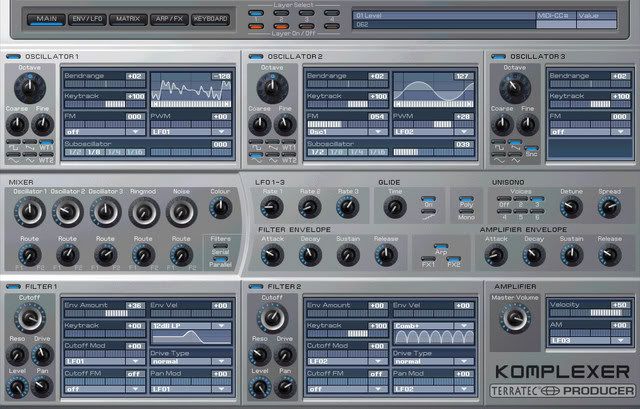
Quote:
Legendary sound and fantastic possibilities: The KOMPLEXER VST synthesizer
With virtual analog and wavetable synthesis, the KOMPLEXER VST synthesizer sets new standards for VSTi instruments. Featuring classic synth sound powered by 5 oscillators, 2 multimode filters, 4 ADSDSR envelopes and 3 LFOs, the KOMPLEXER VST plays in the premier league of VST instruments. Its ability to import Waldorf microQ® sounds underscores the KOMPLEXER VST’s status as an exceptional sound-sculpting engine.
Courtesy of the application’s groundbreaking macro controllers, presets can be modified to suit every taste using just eight parameters, an improvement in handling ease that not only newbies will welcome. Power users naturally also have unrestricted access to all of the sophisticated synthesis engine’s 400 parameters.
Features such as the advanced arpeggiator and LFO 3’s synchronizable user-specific waveform serve to create striking soundscapes that adapt automatically to the given song tempo. With KOMPLEXER VST, a further legendary, professional synthesizer is now available in any VSTi-compatible software.
Thanks to its seamless integration into VST environments, the KOMPLEXER VST offers a further range of practical features such as full automation.
Naturally, the KOMPLEXER VST can also be used in standalone mode, without VST host software.
Enrich your musical expression with the groundbreaking sounds of the KOMPLEXER VST!
Virtual analog synthesizer for Windows
Legendary sound
Up to five oscillators per voice with sync and ring modulation
Additional wavetable synthesis
Imports Waldorf microQ® sounds
Eight macro controllers
Up to 256 voices
Unrestricted access to the sound synthesis engine
Two multimode filters (8 types, including comb filter)
Flexible modulation matrix
Four ADSDSR envelopes
Three LFOs (LFO3 with user waveform)
Extensive arpeggiator functions with user pattern
Five effect units offering delay, reverb, chorus, phaser, distortion
Full automation support, controllable via MIDI controller
VST plug-in for Windows 98, 2000, XP (32/64)
Code:
http://rapidshare.com/files/52609527/TerraTec_Komplexer_VSTi_v1.0.20_by_best_up.rar
---------------------------------------------------------------------
reFX.Vanguard.VSTi.v1.6.1
Quote:
reFX presents VANGUARD, a new breed of virtual analog synthesizers. VANGUARD is the long awaited replacement for your old 19" hardware gear which you will never use again after you have tried VANGUARD.
VANGUARD is a complete new product. reFX has put all its knowledge and experience collected over the years into this project, and the result is audible: virtual analog synthesis has just made a big step forward.
VANGUARD combines the good old analog synthesizer idea with the latest technology. All analog devices of classic synthesizers are emulated by high-quality DSP (digital signal processing) functions. reFX spent a lot of time programming the synthesis functions, and the result is a warm and rich sounding synthesizer plugin with all the benefits of todays digital technology.
VANGUARD is more than just a simple synthesizer. It is equipped with 31 different type of oscillators, including uncommon digital oscillators with fresh modulation options. There is also a huge selection of filters. 13 filter types are onboard with different slopes and including a new kind of combined dual-filter variations.
In need of inspiration? No problem for VANGUARD - the trancegate and arpeggiator can help you out! The trancegate is a 16-step gate to create rhythmic gated patterns and the arpgeggiator comes with inspiring patterns and several play modes. In addition to these creative tools VANGUARD is equipped with a delay and reverb.
Code:
http://rapidshare.com/files/14713413/ReFX.Vanguard.VSTi.v1.6.1_by_best_up.rar.html
Synthation Vanguard Essentials Soundbank
Code:
http://rapidshare.com/files/14713815/Synthation_Vanguard_Essentials_Soundbank_AMPLiFY_by_best_up.rar.htm
-------------------------------------------------------------
Native Instruments FM8

Quote:
Contemporary Classic
FM synthesis has played a huge role in music culture over
the last few decades. The FM8 picks up where its
award-winning predecessor, the FM7, left off taking FM
synthesis even further. FM8's emphasis on ease-of-use
brings a high degree of simplicity to the otherwise
intricate process of FM synthesis. The powerful new audio
engine delivers unsurpassed quality, generating a livelier,
more energetic sound than ever before.
Synthesis From The Start
A central aspect of FM8 is usability. The "Easy Edit Page"
offers a clearly designed interface with simple controls
that adjust more complex parameters automatically, allowing
you to take a far more musical approach to FM synthesis.
The more detailed editing pages have been improved for
easier handling and are all accessible with just one click.
FM8 lets you play straight away!
Beyond Frequency Modulation
The FM8 offers an unprecedented range of features and
effects. The classic metallic leads, crystalline chimes,
tight basses and enchanting rhythmic sounds are just the
beginning. A unique arpeggiator, a revolutionary sound
morphing feature and a large selection of new, charismatic
effects add countless sound-shaping possibilities. The
sonic potential of FM8 goes well beyond the confines of
conventional FM synthesis.
Instilled With Inspiration
Included with FM8 are over 960 ready-to-play factory
presets. From clean, dynamic, percussive sounds to pads,
leads, brass and piano sounds, the presets exemplify the
strengths of FM synthesis. Also included are a number of
effect rack, sound morphing and arpeggio presets. The
integrated KoreSound® Browser makes managing the
KORE-configured presets fast and easy. Simply search and
you will find - instantly.
Code:
http://rapidshare.com/files/52608063/Native_Instruments_FM8_by_best_up.rar
------------------------------------------------------------
Rob.Papen.ConcreteFX.Blue.VSTi.v1.6.3b
Quote:
Rob.Papen.ConcreteFX.Blue.VSTi.v1.6.3b.incl.KeyGen-BEAT
Following the huge success of Albino, Rob Papen has teamed up
with music software developer Jon Ayres to bring you his
latest cross-fusion virtual synthesizer BLUE.
This fresh new synth delivers FM Synthesis, Phase Distortion
Synthesis, Wave Shaping Synthesis and Subtractive Synthesis is
one creative combination!
BLUE has six oscillators which can be connected in various
ways, two analogue style modelled stereo filters, an enormous
range of processing and modulation options and an incredibly
powerful sequencer, all brought together with the
inspirational Rob Papen presets covering a wide range of
musical styles.
Despite these heavy features, BLUE is so easy-to-use thanks to
its user interface and the innovative 'easy edit' page for
quick sound changes!
BLUE promises to exceed your expectations!
latest version
Code:
http://rapidshare.com/files/14798744/Rob_Papen_ConcreteFX_Blue_VSTi_v1.6.3b_by_best_up.rar.html
-------------------------------------------------------
Native Instruments MASSIVE
Quote:
A Modern Masterpiece
MASSIVE is a sonic monster. The analog concept belies the
cutting edge, contemporary sound it generates. The high-end
engine delivers pure quality, lending an undeniable virtue
and character to even the most saturated of sounds. The
interface is clearly laid out and easy to use, ensuring you
will have MASSIVE generating earth-shuddering sounds from
the very first note.
Uncompromising Sound
Covering an exceptionally wide range of styles, MASSIVE is
a true multi-talent. From violently rugged and deep
monophonic bass rumblings to silkily smooth, gliding and
gently fluctuating electronic pads, from techno and
leftfield electronica to pop and film music, MASSIVE's
sonic spectrum is as broad as it is inspiring. This unique
synthesizer has its own uncompromising character that
produces the most distinctive of sounds.
Good To Go
Equipped with some 460 production-ready presets and
multi-sounds, all crafted by leading artists and designers,
you can start using MASSIVE immediately and without any
fuss. The integrated KoreSound® Browser makes managing the
KORE-configured presets easy. Fast search and filter
functions let you find presets according to specific
characteristics and attributes – a particularly musical and
intuitive approach.
Center Stage
On stage, MASSIVE is sure to grab the limelight. An array
of special features makes it ideal for live performances.
The integrated step sequencers and effects section as well
as a highly flexible modulation concept deliver the
necessary versatility. All these features have been
implemented with a focus on usability, with the result that
MASSIVE is just as easy to use on a hectic stage as it is
in the creative environment of a studio.
Image
Code:
http://rapidshare.com/files/52606070/Massive_by_best_up.rar
----------------------------------------------------------------
ReCycle 2.1
Quote:
Loops, grooves and breakbeats: Powerful sonic building blocks, and great inspirational triggers. No matter what style of music you're into, you can be sure there's a loop out there that can spice your track up a little, or even lift it to completely new heights. But handling loops and grooves equals hard work. Hours of pitching and stretching just to get a loop to fit your song's tempo and timing. And if you need to change the key, you're in for even more work. In the end, your loops are controlling you, instead of vice versa. But help is on its way. From Propellerhead Software comes a suite of programs that gives you full creative control over your looped material!
Welcome to ReCycle 2.1 - The Ultimate Toolkit for Sampled Grooves.
ReCycle goes way beyond simply solving groove problems and cleaning up your loop act - it's a highly creative tool that helps you make the most of your grooves. In simple terms, ReCycle lets you do with sampled loops what you can do with beats programmed from individual drum sounds - like alter the tempo, or replace sounds and process them individually. ReCycle turns concrete-rigid loops into musical modeling clay, allowing you, the loopist, to do pretty much what you desire.
Tempo and Timing
Automate the tedious process of making a sampled groove fit the tempo of your song.
Change the tempo of a groove without altering its pitch.
Change the timing of the groove - you can even quantize it!
Tuning and Detuning
Change the pitch of a groove without altering its tempo.
Make pitched grooves (like guitar riffs) fit into songs in other keys.
Remodel the Groove!
Remove and/or replace any sound inside the sampled groove without altering its feel.
Create variations and fills out of a single loop.
Alter the volume of the individual sounds in the groove.
Processing
Use ReCycle's Envelope, Transient Shaper and EQ to energize your loop.
Send different sounds in the groove to different sampler outputs or audio channels, for individual processing.
Alter the ambience of a groove.
Automatically normalize the levels of the sounds in the groove for optimum sound quality.
Go beyond the Loop!
Automatically isolate and extract individual sounds out of long samples.
Use the feel of the groove to quantize other MIDI recordings.
Code:
http://rapidshare.com/files/52608273/Propellerheads.ReCycle.v2.1_by_best_up.rar
--------------------------------------------------------------------------------
U-he.Filterscape.VST.v1.1
Quote:
Filterscape is a flexible sound bending plug-in. It's a parametric equalizer. It's a virtual analog filter. It's a delay effect. It's a modulation device. It's all at once - and more. It offers you the tools and flexibility to spice up your music in ways beyond imagination.
Most of all, Filterscape is great fun to use and to listen to. It's addictive!
But it doesn't stop here. Filterscape comes with 2 sister plugins (included!), one of which is Filterscape VA, a virtual analog synthesizer based on Filterscape's modular architecture, and Filterscape Q6, a 6-band equalizer with dynamic capabilities!
Code:
http://rapidshare.com/files/14807253/U-he.Filterscape.VST.v1.1.incl.KeyGen.READ.NFO.400th.release_by_best_up.rar.html
------------------------------------------------------------
ExpDigital.G-Flux.v1.0.2.VST
Quote:
GFlux is a multi mode modulated filter. But this simple description fails to do justice to the complex sound design tool that GFlux is!
We started with four independant filters, each capable of outputing Low Pass, Band Pass, High Pass, Notch and Peak filter types simultaneously. Then we added four modulation blocks to give expression to your sound.
Each modulation block can be either, A drawable LFO, the loop envelope, and ADSR or an envelope follower. Every filter parameter is modulatable from these sources via the extensive modulation matrix. You can also apply arithmetic functions to your control signals to vary the sound even more! For example you could multiply two modulators together, or choose the maximum modulation value from two sources!
The core of GFlux is the concept of the 'flow'. Each flow represents a different filter layout, controlling which filters feed to others. The flows range from simple 8 pole filters right through to insane serial / parallel networks. These flows cover almost all the possibilities for routing and combined with the separate level control for each filter state you can create amazingly complex filter responses. We've also thrown in everything that you would expect from a top flight plugin - Loads of presets (over 80), Full midi and host control of all sound altering parameters
Code:
http://rapidshare.com/files/14750894/ExpDigital.G-Flux.v1.0.2.VST-AMPLiFY_by_best_up.rar.html
-------------------------------------------------------------------
iZotope_Ozone_v3_1
Quote:
Ozone 3 includes all the tools you need to master the commercial sound in seconds. Professionally designed presets and the acclaimed Ozone Mastering Guide walk you step by step through making radio-ready masters.
The process of mastering ranges from correcting mistakes made in the mix to preparing a recording for target listening environments. Like a final coat of polish, mastering makes the difference between a good sounding mix and a professional sounding master. Ozone includes integrated tools for each step of the process: add broad equalization to balance the tone, multiband compression to control the dynamics, harmonic excitation to inject punch and sparkle, stereo imaging to sculpt the sound stage, loudness maximization to raise the level of the entire track to the standard for commercial use, and dither to maintain every last bit of quality. Since Ozone was designed to address the mastering process, all the components work together to help you put that final professional sound on a project. With Ozone 3, be prepared to love your sound.
Code:
http://rapidshare.com/files/14753490/iZotope_Ozone_Setup_v3_10_by_best_up.rar.html
--------------------------------------------------
Anwida VST Eq Pack
Quote:
5 professional quality audio plug-ins in a single bundle.
CX1V - compressor/expander
Great simplicity of use, and several features not commonly available in compressors (look ahead, hard/soft knee, above threshold easy monitoring). The CX1V compressor/expander offers an extremely transparent action with a natural and smooth response.
L1V - limiter/maximizer
Its transparent action allows it to be used both to control the dynamics of single tracks and to maximize the level of the final mix. Particular care has been taken in creating an algorithm that assures high precision limiting action.
GEQ15V, GEQ31V - constant Q graphic equalizers
12 dB of boost or cut at any of, respectively, 15 or 31 bands centered around International Standards Organization (ISO) 2/3 or 1/3 octave frequencies from 20Hz to 20KHz. The warmth of classic analog devices with the clarity and the accuracy of the digital domain processing.
PEQ1V - parametric equalizer
An intuitive interface that drives a powerful constant Q, minimum phase equalization algorithm. The tool of choice to control the equalizations of vocal parts, instruments or complex mixes.
The superior audio quality and ease of use make the Equo Pack the best option for mastering purposes and mixes.
Code:
http://rapidshare.com/files/14722373/ANWIDA_VST_PACK_by_best_up.rar.html
-----------------------------------------------------------------
Waves Diamond Bundle 5.2
Quote:
The Waves Diamond Bundle is our definitive collection of audio processing tools. The Diamond Bundle now includes Q-Clone, Waves Tune LT, L3 Multimaximizer, and IR-L Convolution Reverb as well as all the plug-ins found in Waves Platinum , Restoration , and Transform bundles—a total of 40 essential processors. Diamond brings unparalleled signal processing power to your studio, for tracking, mixing, mastering, creative sound design, and audio restoration. From dynamics processing, equalization, and reverb to pitch correction, spatial imaging, and beyond, Waves Diamond Bundle is a must-have for every serious studio.
Included Plug Ins
L3 Ultramaximizer™
C4 Multiband Parametric Processor
L2 Ultramaximizer Doppler
UltraPitch L1 Ultramaximizer
Maxx Bass
Linear Phase Multiband
Linear Phase Equalizer
MetaFlanger
True Verb Room Emulator
Q10 Paragraphic Equalizer
S1 Stereo Imager
Renaissance Channel
Renaissance Equalizer
Renaissance DeEsser
C1 Parametric Compander
Audio Track
PS22 Stereo Maker (TDM only)
Renaissance Compressor
Renaissance Reverberator
PsychoAcoustic Analyzer
Renaissance Bass
Enigma
MondoMod
Super Tap
DeEsser
Renaissance Vox
Code:
http://rapidshare.com/files/14813579/waves_diamond_bundle_5.2_by_best_up.rar.html
--------------------------------------------------------------------
D16.Phoscyon.VSTi.v1.5.7
Quote:
Phoscyon is a vintage analogue modeled Bassline synthesizer with a unique low pass filter with an 18db/oct dumping and constant resonance amplitude throughout the entire frequency domain. The filter sounds phenomenal! Hear that squelch and you’ll swear its analogue! We’ve also equipped it with a fully customizable integrated arpeggiator (essential in electronic music) as well as an exhaustively analogue modeled distortion effect, crucial for those screaming acid bass lines!
Code:
http://rapidshare.com/files/14729855/d16.phoscyon.vsti.v1.5.7_by_best_up.rar.html
------------------------------------------------------
NATIVE INSTRUMENTS TRAKTOR DJ STUDIO V3.2
Quote:
Professional DJ Software
TRAKTOR 3 is a versatile and comprehensive digital DJing solution designed to meet the most professional of standards. The third generation of this award-winning software offers breath-taking sound quality coupled with an unprecedented array of new features – sure to get any party rocking. Discover the potential of TRAKTOR 3 and blend a new dimension of creativity into your mi
Code:
http://rapidshare.com/files/14779046/native.instruments.traktor.dj.studio.v3.2_by_best_up.rar.html
---------------------------------------------------
PSP.Audioware.608.MultiDelay.VST.DX.RTAS.v1.1
Quote:
PSP 608 MD is perhaps the most fully featured delay plug-in available on the market (VST, AudioUnit and RTAS format for Mac OSX Universal Binary and VST, DirectX and RTAS format for Windows). We have striven to offer you a creative tool that is not only functional, but inspiring. Each tap has selectable feedback, stereo image and position, delay time, multimode filter, modulation, drive/tape saturation, and reverb. Moreover, the feedback and drive can be placed at the beginning or end of the signal chain for even more sound design options! The modulation section consists of both an LFO and Envelope follower, and the tape saturation algorithm is taken from our renowned mastering processors. And of course all this can be done at any bit depth and sample rate up to 24-bit, 192kHz, and be fully automated via MIDI and any host sequencer.
Code:
http://rapidshare.com/files/14794093/psp.audioware.608.multidelay.vst.dx.rtas.v1.1-air_by_best_up.rar.html
-----------------------------------------------------------------
PSP.Audioware.Nitro.VST.DX.RTAS.v1.1
Quote:
PSP Nitro is the ultimate multimode filter plug-in in VST, DirectX, RTAS format for Windows; AudioUnit, VST, RTAS format for Mac OSX Universal Binary. It offers many filter types derived from analog prototypes in addition to other useful processing blocks such as phaser, bit-crusher/downsampler, waveshaper and interpolated delay blocks. These can be connected to each other using virtually any routing scheme. The advanced control signal generators are capable of modulating most of the processing parameters, making this plug-in an essential tool for sound design and experimental purposes.
Code:
http://rapidshare.com/files/14794580/psp.audioware.nitro.vst.dx.rtas.v1.1-air_by_best_up.rar.html
-------------------------------------------------------------------------------
PSP.Audioware.PSP.84.VST.DX.RTAS.v1.5
Quote:
PSP 84 is a high-quality processor, capable of producing a wide variety of delay-based effects. Two independent delay lines operating with variable sampling rate and precise tape saturation algorithm with adjustable gain, allow for convincingly sounding simulation of tape delay, including all the exciting effects resulting from tape speed instability. A filtration section consisting of three 2nd order switchable resonant filter types can be used to process input, feedback or wet signal. The adjustable slope of the filter ranges from a gentle curve, which is useful for simulating high frequency absorption typical for tape delay and wet signal equalization to an extremely steep curve with a high cutoff frequency peak, making all the wild wah-wah and resonance effects easily available. Delay line sampling rate and filter cutoff can be modulated by any of the 5 LFO waveforms that are automatically synchronized to the sequencer tempo or envelope follower with adjustable sensitivity and attack/release. Moreover, the PSP 84 contains the fully functional reverb unit, with simplified settings carefully tuned to exactly reproduce the sound of classic spring and plate reverberators
Code:
http://rapidshare.com/files/14796732/psp.audioware.psp.84.vst.dx.rtas.v1.5-air_by_best_up.rar.html
-------------------------------------------------------------------
Dash.Signature.EVE2
Quote:
EVE was made to recreate in the virtual world of softsynths the exciting and immediate experience of the early age of electronics in pop, rock and jazz music from the 1960’s and 1970’s
In this creative period in music history, many musicians started to employ the innovative sounds of the ‘electric keyboards’ which were newly available for use on stage and in the studio: Rhodes electric pianos, Hammond and Vox organs, Hohner clavinets, strings machines such as the Arp Solina string ensemble, Moog synthesizers, and all those that are now considered ‘classics’.
Not only were keyboards a part of this revolution in popular music, but the use of effects and recording techniques for layering, blending and manipulating sounds transformed the way music was produced and conceptualized: Tape based delay lines, rotating speaker cabinets, guitar distortion pedals, wah wah, phasing, flanging and other effects became an integral part of the process of sound design.
EVE takes these vintage sounds and this early approach to ‘electronic’ music production as a starting point, and brings this general philosophy and sound into the modern virtual environment with an intuitive and powerful interface. At the core of the EVE approach to sound design is the basic structure of 3 sample-playing layers, 2 multi-effect racks, and a selected library of multisampled ‘electric keyboards’.
This enables the blending of several waveforms and instruments into a vintage wall of sound, or alternatively, the use of the 3 layers multi-timbrally as a vintage workstation. These layers can then be further processed through the EVE’s powerful multi-effect racks.
There is a well designed system of parameters for tweaking instruments and effects towards musical results, with all parameters accessible on a single page for easy and intuitive sound design.
Using EVE 2 is just like having the vintage boxes at your fingertips.
What's EVE 2?
EVE 2 adds several enhancements and new synthesis features to the simple yet powerful EVE design. All the original functionality and ease of use is still there, with the following changes and additions –
• The original LP resonant filter per layer in EVE has been replaced by a multimode filter (LP, HP, BP, BR) with control over cut, resonance and envelope modulation, as well as a special ‘fractal’ modulation parameter. This expanded filter design provides further tools for balanced layering of sounds, and deep pads.
• FM/AM modulation capabilities per layer have been added via the ~FM switch matrix. FM and AM can be used to add interesting harmonic distortions to the original instruments, or to manipulate new sounds from the existing samples.
• The vintage multi-effect racks have been updated, with an expanded ECHO rack, and a new overdrive effect in the MODULATOR rack, as well as various enhancements to other effects.
• New routing options between the layers and the effects allow the MODULATOR rack to function in both ‘send’ and ‘insert’ modes.
• EVE 2 now supports the loading of WusikSND SoundSets, opening up a whole range of extra sample content that can be loaded into the EVE engine. Due to synth design differences, EVE 2 does not load Wusik presets (FXP, FXB, BNK or WusikPRST files). For EVE 2 to read WusikSND SoundSets, they must be installed into the ‘EVE Data’ directory in any subfolder.
• The EVE 2 default sound library features new SoundSets and presets in addition to those that shipped with EVE.
EVE Features
3 wave player sections with:
* ADSR envelope
* Velocity sens
* Double KeyTrack scaling
* LP (LowPass) filter with resonance
* 3 band equalizer
* Pitch, Amp and Pan LFOs
* Pitch envelope enable
* Semitone transpose
* Fine pitch
* Send to FX 1
* Send to FX 2
* Volume
* Mute switch
* VU meter
* Velocity Zone: min and max
* Key Zone : high and low
* Polytimbric over 3 parts
* 3 modes for each LFO: Free, Sync, Inv.
* FM and AM per Osc.
Master controls:
* Glide
* mono mode
* LFO masters
* fine tuning
* Velocity sens.
Two DSP sections:
* Echo (true stereo vintage tape delay emulation, with Sync Chorus)
* Modulator (Leslie, Chorus, Flanger, Phaser, Wha Filter, OverDrive)
MIDI Learn: More than 100 parameters remotely controllable by Midi Control Changes
300+ high quality presets.
List of some of the many multisamples
bundled with EVE 2
* CP 70B
* D6 Clavinet
* Rhodes 73 MK I
* Suitcase 88
* Mellotron Strings
* PE2000 Strings
* Solina
* Trident String Brass Combi
* Vintage Strings O3
* B3 Percussive Dry
* CX Drawbar Set (4 versions)
* Vox Continental C
* Several analog waveforms
* A complete Electro Drum Set
* Minimoog
* PolySix
* Wurlitzer EP
* Zvon Prepared Rhodes
* Fairlight
* Ethnic sounds
Code:
http://rapidshare.com/files/14740394/DashSignature.EVE2_by_best_up.part1.rar.html
Code:
http://rapidshare.com/files/14750321/DashSignature.EVE2_by_best_up.part2.rar.html
-------------------------------------------------------------------------------
Crysonic.SpectraPhy.v1.0.VST
Quote:
Spectra'Phy™ -is the first Mastering grade look-ahead brickwall limiter of it's type to utilize the principals of mechanical physics for Audio processing. The innovative approach represents a paradigm shift in the way these types of DSP effects have been designed to date. The unique method employed easily allows the mastering engineer to achieve maximum perceived "loudness" transparently without ever getting overshoots (Digital-over's) with minimum audible distortion. The characteristics of the final audio can quickly be adjusted to taste, be it analog or digital with only two rotary-dials. The drive / color dial component also allows the addition of analog saturation when "running hot", this can naturally be disabled if not required. Spectraphy has been designed for ease of use and efficiency in mind without sacrificing creative freedom.
Code:
http://rapidshare.com/files/14728908/Crysonic.SpectraPhy.v1.0.VST-AMPLiFY_by_best_up.rar.html
---------------------------------------------------------------------------------------
Waves SS 4000 VST DX RTAS.v1.1
Quote:
Developed under license from Solid State Logic, The Waves SSL 4000 Collection includes three meticulously modeled plug-ins based on the legendary SSL 4000 Series: the SSL E-Channel, the SSL G-Master Buss Compressor, and the SSL G-Equalizer.
Quote:
Waves engineers spent more than a year analyzing and modeling the distinctive sonic characteristics of SL 4000 factory reference consoles and components provided by Solid State Logic. These plug-ins sound so close to the original consoles, even experts who work with SSL boards day in and day out can’t tell the difference
Code:
http://rapidshare.com/files/14809146/Waves_SS_4000_VST_DX__RTAS.v1.1_by_best_up.rar.html
------------------------------------------------------------
Steinberg WaveLab v5.01b
Quote:
WaveLab 5 is the only all-in-one solution for high resolution stereo and multi-channel audio editing, mastering, CD/DVD burning and for complete CD or DVD Audio production in outstanding audio quality. WaveLab is not just a top level mastering tool, it also offers capabilities for multimedia, sound design with samplers, radio broadcasts, and computer telephony applications. This is why WaveLab is the leading application for digital audio editing.
Code:
http://rapidshare.com/files/14800644/Steinberg_WaveLab_v5.01b_by_best_up.rar.html
------------------------------------------------------------------------------------------
Reason tools
Propellerheads Refill Packer v3.0
Code:
http://rapidshare.com/files/14787126/Propellerheads_Refill_Packer_v3.0_by_best_up.rar.html
Propellerheads Refill Viewer
Code:
http://rapidshare.com/files/14787207/Propellerheads_Refill_Viewer_by_best_up.rar.html
Propellerheads Reload v1
Code:
http://rapidshare.com/files/14787298/Propellerheads_Reload_v1_by_best_up.rar.html
--------------------------------------------------------------------------------------------
Celemony.Melodyne.Studio.Edition.v3.1.2.0
Quote:
Melodyne is currently a stand-alone application PC and its purpose in life is to analyse audio minutely and then process it such that almost everything about it can be altered at will. It can shift the pitch of monophonic audio without changing duration, change duration or tempo with or without changing pitch, and manipulate formants to alter voice or instrument character or to improve the character of shifted audio. It allows you to create harmonies from one vocal, or indeed construct whole new melodies, as well as making vocals and instruments do things they couldn't normally do. It can force audio of different tempos to run at one tempo, quantise audio timing, correct pitching errors across an entire track or one note at a time, superimpose pitch information from one melody onto another without affecting lyrics, alter amplitude, edit transitions between notes, and even alter vibrato. While it usually requires monophonic audio, it works on drum and percussion loops and will also process strummed guitar. Sounds impressive?
Code:
http://rapidshare.com/files/14727264/Celemony.Melodyne.Studio.Edition.v3.1.2.0_by_best_up.rar.html

6 comments:
Wow, nice run-down there, this'll keep me busy for a while
I do not even know how I ended up here, but I thought this submit was good.
I don't realize who you're but definitely you're going to a famous blogger in the event you aren't
already. Cheers!
Also visit my page: Generateur De Code PSN
Hi excellent blog! Does running a blog such as this require a great
deal of work? I have very little knowledge of
computer programming but I was hoping to start my
own blog in the near future. Anyway, if you have any ideas or tips for new blog owners please
share. I understand this is off subject nevertheless
I just needed to ask. Thank you!
My website Candy Crush Saga Hack
Hello would you mind letting me know which web host you're utilizing? I've
loaded your blog in 3 different internet browsers and I must say this blog loads
a lot quicker then most. Can you suggest a good web hosting provider at a honest price?
Thanks a lot, I appreciate it!
my blog :: Dragon City Hack
Hi there! Someone in my Facebook group shared this site with us
so I came to look it over. I'm definitely enjoying the information. I'm bookmarking and will be tweeting this to
my followers! Exceptional blog and brilliant style and design.
my web-site ... video games -
-
I do believe all of the ideas you have presented on your post.
They are very convincing and will definitely work.
Nonetheless, the posts are very brief for newbies. May you please extend
them a little from subsequent time? Thanks for the post.
My page - learn to sing like your favorite artist
Post a Comment